


Rent server on
1. Create key
Go to https://clarity-delta.make.services/ and register via Google or GitHub. After login press Create Account Key, fill Name and click Save:
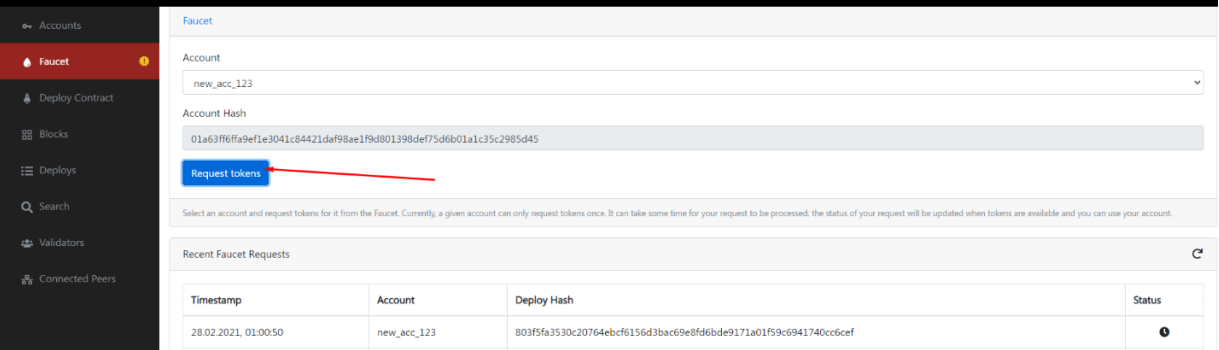
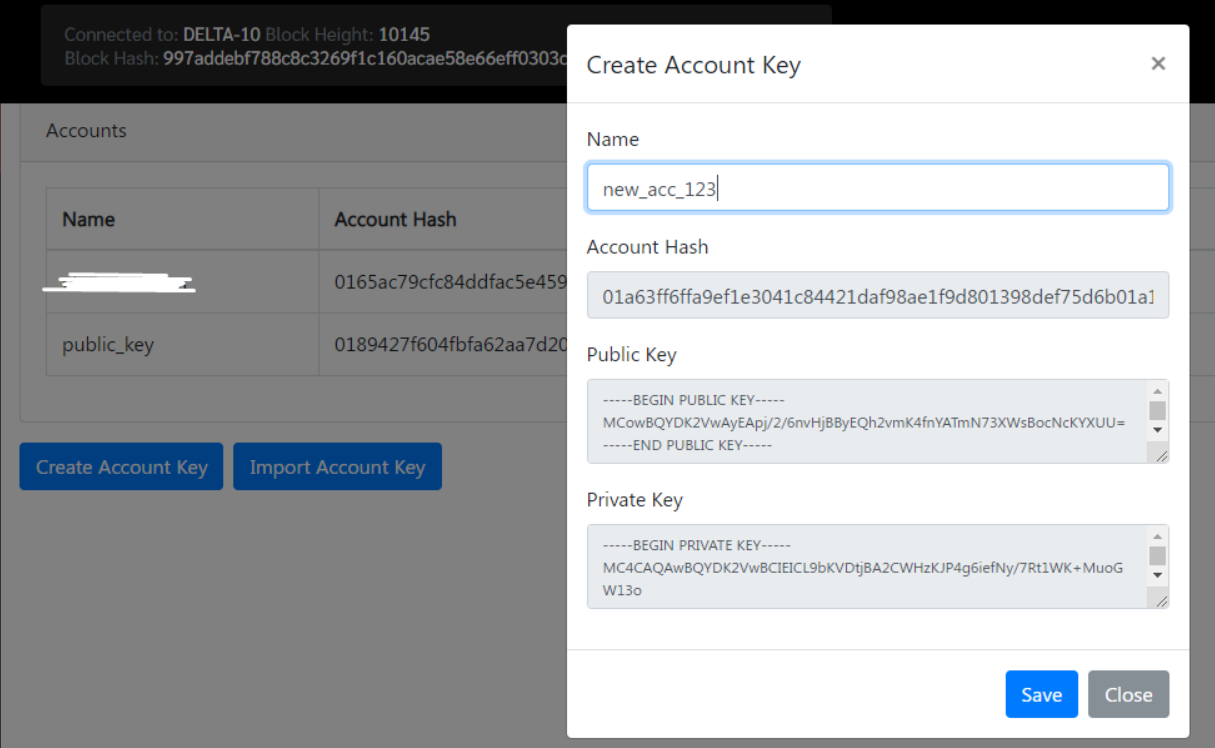 The system downloads three files. Additionally please save Account Hash, Public Key и Private Key. Go to Faucet, select created account and click Request tokens.
2. Dependencies installation
sudo apt-get update
curl --proto '=https' --tlsv1.2 https://sh.rustup.rs/ -sSf | sh
source $HOME/.cargo/env
sudo apt install build-essential
3. Node and Contract installation
git clone https://github.com/CasperLabs/casper-node.git
cd casper-node
git fetch
git checkout release-0.7.6
make setup-rs && make build-client-contracts -j
curl -JLO https://bintray.com/casperlabs/debian/download_file?file_path=caspernode-launcher_0.2.0-0_amd64.deb
curl -JLO https://bintray.com/casperlabs/debian/download_file?file_path=casperclient_0.7.6-0_amd64.deb
sudo apt install -y ./casper-client_0.7.6-0_amd64.deb ./casper-nodelauncher_0.2.0-0_amd64.deb
cd /etc/casper
sudo -u casper ./pull_casper_node_version.sh 1_0_0
sed -i "/trusted_hash =/c\trusted_hash = '$(curl -s 159.69.218.20:8888/status | jq -r .last_added_block_info.hash | tr -d '\n')'" /etc/casper/1_0_0/config.toml
sudo logrotate -f /etc/logrotate.d/casper-node
sudo /etc/casper/delete_local_db.sh
4. Keys installation
Copy 3 files from step 1 to /etc/casper/validator_keys/. You can use ftp or vim + Copy+Paste functionality.
5. Adding Validators
Edit /etc/casper/1_0_0/config.toml and replace known_addresses by:
known_addresses = ['18.144.176.168:35000', '13.57.200.251:35000', '134.122.14.111:35000','144.91.83.59:35000','135.181.42.149:35000','78.47.14.48:35000','94.19.229.130:35000','107.22.247.79:35000','161.97.136.153:35000','46.4.91.24:35000','139.59.247.32:35000','195.201.148.78:35000','35.233.165.80:35000','45.61.52.142:35000','35.236.56.221:35000','35.192.213.171:35000','103.212.121.38:35000','35.239.228.18:35000','178.20.44.91:35000','103.149.26.208:35000','157.90.92.114:35000','116.202.24.91:35000','135.181.162.15:35000','78.47.135.157:35000','207.180.199.157:35000','95.216.217.219:35000','78.46.121.69:35000','157.90.113.149:35000','157.90.115.85:35000','157.90.113.111:35000','116.203.157.37:35000','78.47.58.209:35000','116.203.150.238:35000','157.90.26.198:35000','88.99.215.12:35000','168.119.49.220:35000','168.119.179.241:35000','78.141.239.219:35000','78.46.124.118:35000','144.91.112.255:35000','88.99.171.225:35000','135.181.147.7:35000','116.203.214.160:35000','95.216.196.103:35000','116.202.106.191:35000','78.46.229.114:35000','157.90.113.162:35000','78.47.11.140:35000','95.142.46.183:35000','95.217.2.40:35000','116.203.95.147:35000','78.47.10.119:35000','168.119.123.213:35000','167.86.91.16:35000','80.122.107.238:35000','159.69.218.20:35000','116.203.206.169:35000', '50.18.76.62:35000', '54.241.222.9:35000', '3.101.150.105:35000']6. Node start
sudo systemctl enable casper-node-launcher
sudo systemctl start casper-node-launcher
Check status, it should be active(running):
sudo systemctl status casper-node-launcher
7. Utilities installation
cd ~
cd casper-node
wget https://raw.githubusercontent.com/matsuro-hadouken/casper-tools/master/explorer.sh
wget https://raw.githubusercontent.com/matsuro-hadouken/casper-tools/master/active_validators.sh
wget http://genesis.casperlabs.io/validate_ip.sh
wget https://raw.githubusercontent.com/matsuro-hadouken/casper-tools/master/balance_check.sh
sudo chmod +x *.sh
8. Check ports
curl -sSf https://diagnostics.casperlabs.io/sh | sudo sh -All ports will be available except 7777. It becomes active after Node synchronization:
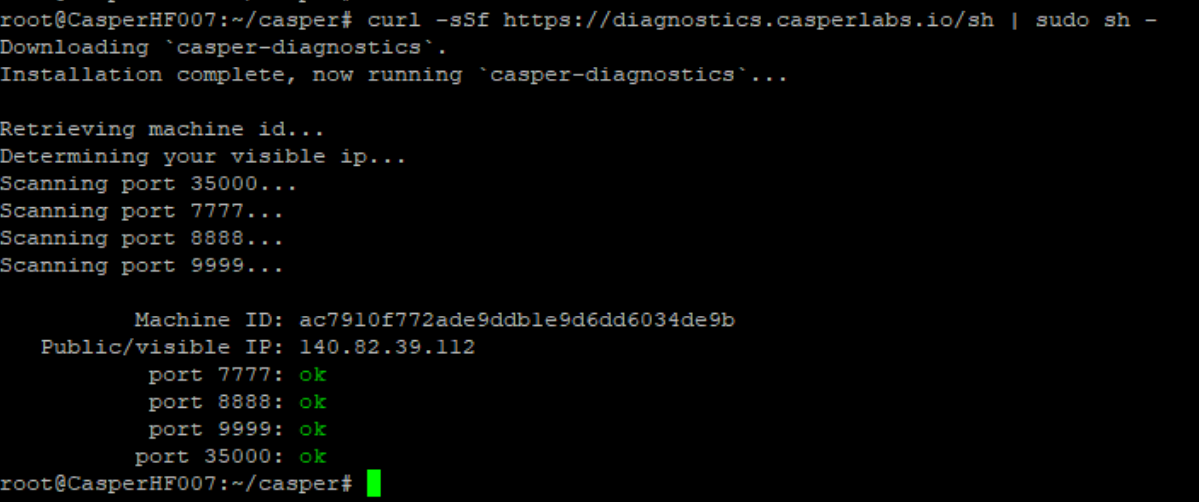
Additionally you can use the following command:
curl localhost:8888/status | jqYou can proceed with the next steps once Node is synchronized.
9. Balance check
~/casper-node/balance_check.sh `cat /etc/casper/validator_keys/public_key_hex`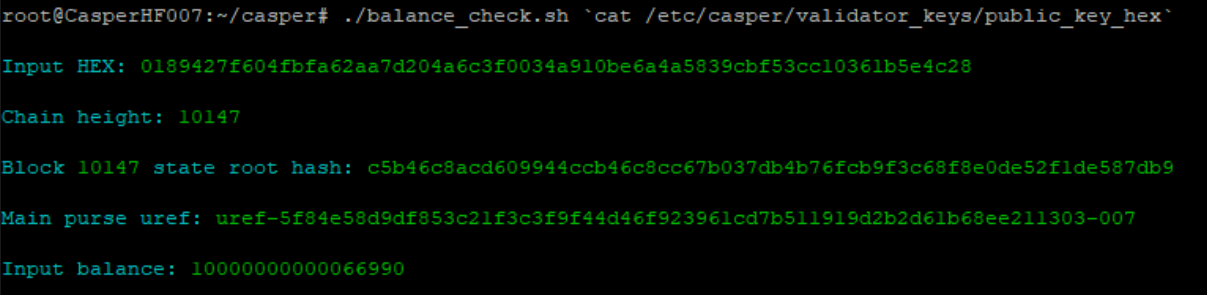
10. IP verification
~/casper-node/validate_ip.sh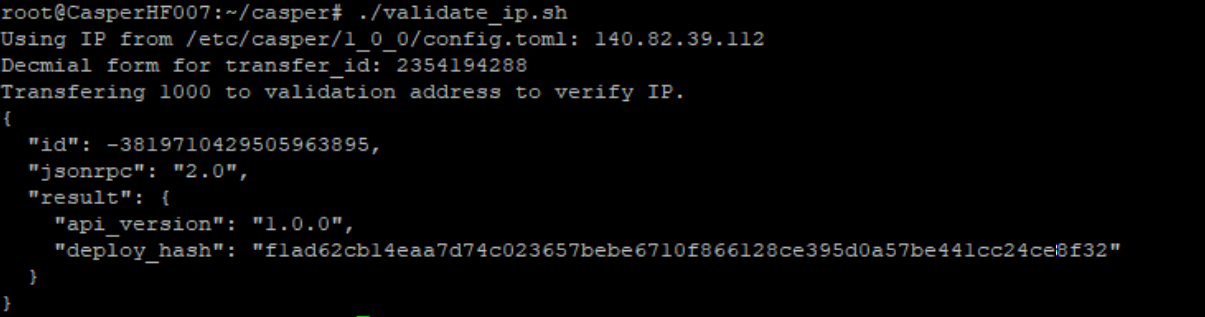
Checking by
curl http://cnm.casperlabs.io/verify/`cat /etc/casper/validator_keys/public_key_hex`11. Validator registration
casper-client put-deploy --chain-name delta-10 --node-address http://127.0.0.1:7777 --secret-key /etc/casper/validator_keys/secret_key.pem --session-path $HOME/caspernode/target/wasm32-unknown-unknown/release/add_bid.wasm --payment-amount 1000000000 --session-arg="public_key:public_key='`cat /opt/keys/public_key_hex`'" --sessionarg="amount:u512='9000000000000000'" --sessionarg="delegation_rate:u64='10'"Checking by
~/casper-node/active_validators.shYou can find required info at the end of this command output.
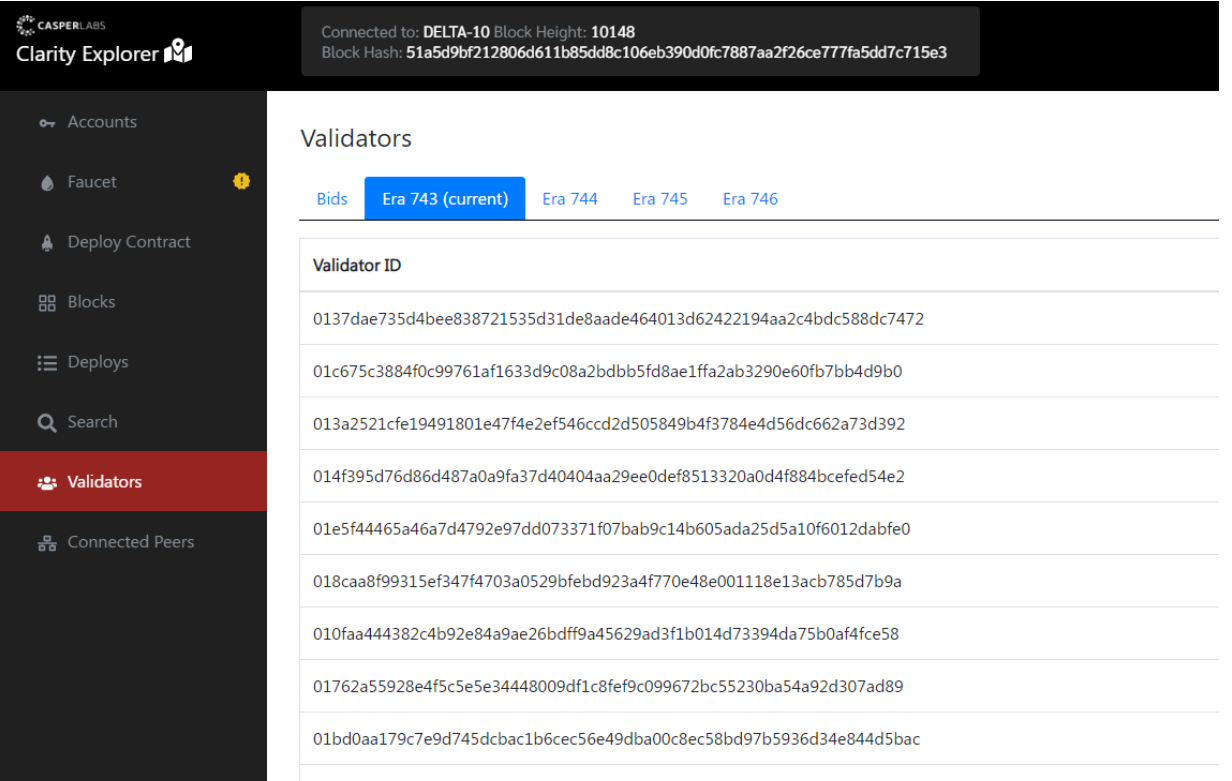
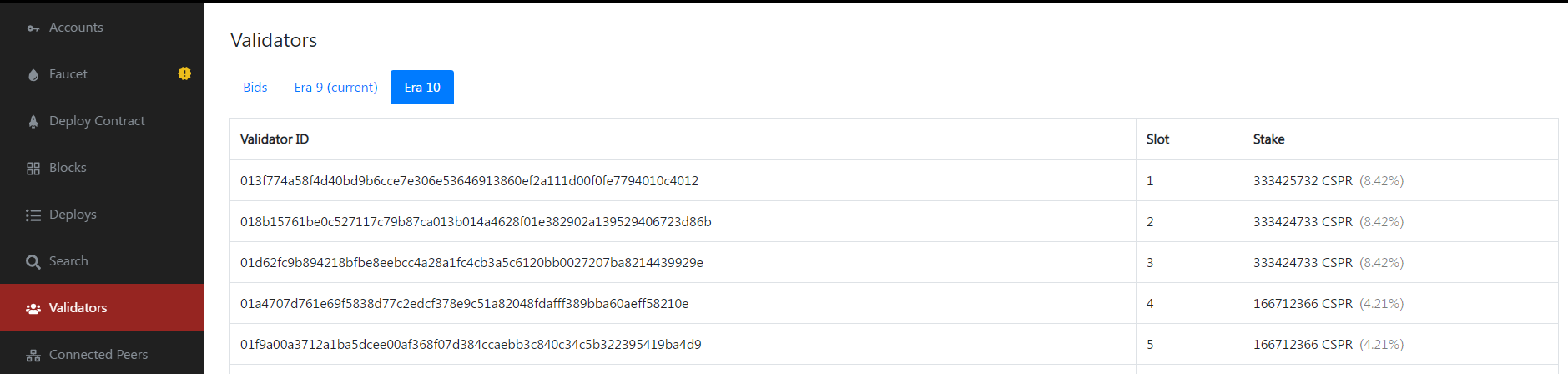
Another option is to check node by Account hash (from step 1) on https://clarity-delta.make.services/#/validators at validators tab:
12. Updating
Check version:
curl -s localhost:8888/status | jq .build_versionIf you already have 0.7.7 then do nothing.

Otherwise do the following:
sudo systemctl stop casper-node-launcher
sudo rm -rf /etc/casper/1_0_0
sudo rm -rf /var/lib/casper/bin/1_0_0
cd /etc/casper
sudo -u casper ./pull_casper_node_version.sh 1_0_0
sudo sed -i "/trusted_hash =/c\trusted_hash = '$(curl -s 13.57.181.239:8888/status | jq -r .last_added_block_info.hash | tr -d '\n')'" /etc/casper/1_0_0/config.toml
sudo logrotate -f /etc/logrotate.d/casper-node
sudo /etc/casper/delete_local_db.sh; sleep 1
sudo systemctl start casper-node-launcher
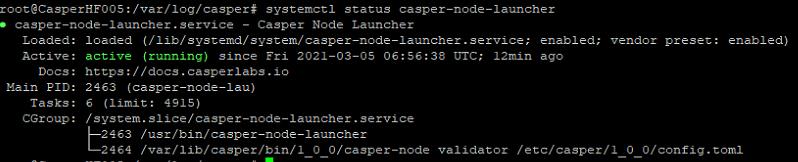
Check service status:
systemctl status casper-node-launcherShould be active (running):
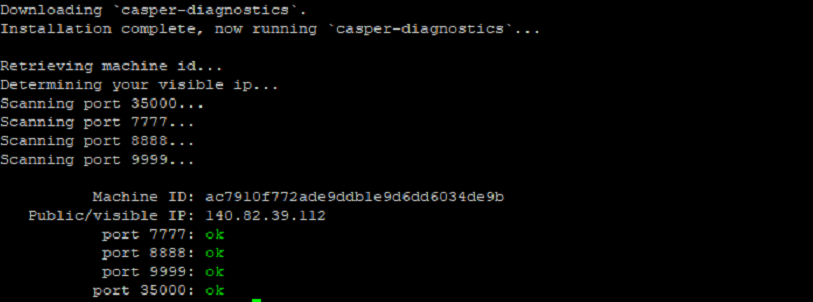
Check ports:
curl -sSf https://diagnostics.casperlabs.io/sh | sudo sh -All ports will be available except 7777. It becomes active after Node synchronization.
13. Upgrade to Delta-11:
Firstly we need to stop the node:
sudo systemctl stop casper-node-launcher.serviceClean up previous version nodes:
sudo rm -rf /etc/casper/1_0_0
sudo rm -rf /var/lib/casper/bin/1_0_0
sudo rm -rf /var/lib/casper/casper-node
sudo rm /etc/casper/casper-node-launcher-state.toml
sudo apt remove -y casper-client casper-node-launcher
Next we should download the update:
cd ~
curl -JLO https://bintray.com/casperlabs/debian/download_file?file_path=casper-client_0.9.3-0_amd64.deb
curl -JLO https://bintray.com/casperlabs/debian/download_file?file_path=casper-node-launcher_0.3.1-0_amd64.deb
Let’s install this:
sudo apt install -y ./casper-client_0.9.3-0_amd64.deb ./casper-node-launcher_0.3.1-0_amd64.deb
sudo -u casper /etc/casper/pull_casper_node_version.sh 1_0_0 delta-11
sudo -u casper /etc/casper/config_from_example.sh 1_0_0
And run:
sudo logrotate -f /etc/logrotate.d/casper-node
sudo systemctl start casper-node-launcher; sleep 2
Let’s check:
systemctl status casper-node-launcherOutput should be like:

14. Validator registration
Contract Compilation:
cd ~
git clone https://github.com/CasperLabs/casper-node.git
cd casper-node
git fetch
git checkout release-0.9.3
make setup-rs && make build-client-contracts -j
Request for validator registration:
casper-client put-deploy --chain-name delta-11 --node-address http://127.0.0.1:7777 --secret-key /etc/casper/validator_keys/secret_key.pem --session-path $HOME/casper-node/target/wasm32-unknown-unknown/release/add_bid.wasm --payment-amount 1000000000 --session-arg="public_key:public_key='`cat /etc/casper/validator_keys/public_key_hex`'" --session-arg="amount:u512='999000000000'" --session-arg="delegation_rate:u8='10'"You can check if your bid was accepted here:
https://clarity-delta.make.services/#/validators
If everything is okay, wait for the next Era and check your node in Validators list.
15. Era-34 Upgrade
Should be done before Era 34. (around 2021-03-18T13:00:00Z)
sudo -u casper /etc/casper/pull_casper_node_version.sh 1_0_1 delta-11
sudo -u casper /etc/casper/config_from_example.sh 1_0_1
Verify this returns ‘activation_point = 34’
cat /etc/casper/1_0_1/chainspec.toml | grep activation_pointVerify this returns ‘casper-node 0.9.3-897b1b5f’
/var/lib/casper/bin/1_0_1/casper-node --versionOne more check to be 146% sure
curl -s localhost:8888/status | jq .next_upgradeShould return
{
“activation_point”: 34,
“protocol_version”: “1.0.1”
}
To check that everything works correctly, check this
curl -s localhost:8888/status | jq .api_versionOutput should be “1.0.1”
16. Social Consensus Upgrade Test
sudo systemctl stop casper-node-launcher
sudo logrotate -f /etc/logrotate.d/casper-node
sudo -u casper /etc/casper/pull_casper_node_version.sh 1_0_2 delta-11
sudo -u casper /etc/casper/config_from_example.sh 1_0_2
sudo -u casper cp /var/lib/casper/bin/1_0_2/casper-node /var/lib/casper/bin/1_0_1
sudo -u casper sed -i 's/1\.0\.1/1\.0\.2/g' /etc/casper/casper-node-launcher-state.toml
sudo -u casper sed -i 's/1_0_1/1_0_2/g' /etc/casper/casper-node-launcher-state.toml
sudo systemctl start casper-node-launcher
17. Delta-11 Upgrade 1_0_3
This upgrade needs installed prior to Era 104.
# This is needed if you installed the first version version from Casper Discord channel there admin accidentally put Era 110 as activation point
sudo rm -rf /etc/casper/1_0_3
sudo rm -rf /var/lib/casper/bin/1_0_3
Upgrade Procedure
sudo -u casper /etc/casper/pull_casper_node_version.sh 1_0_3 delta-11
sudo -u casper /etc/casper/config_from_example.sh 1_0_3
After installing, wait a few minutes and then check
curl -s localhost:8888/status | jq .next_upgradeYou should see:
{
"activation_point": 104,
"protocol_version": "1.0.3"
}
Upgrade Delta Validator node to Test Net Validator
1. Install dependencies
sudo apt remove --purge cmake
hash -r
apt install fuse
apt install gnupg
apt install snapd
snap install cmake --classic
2. Remove old Software
sudo systemctl stop casper-node-launcher.service
sudo apt remove -y casper-client
sudo apt remove -y casper-node-launcher
sudo rm /etc/casper/casper-node-launcher-state.toml
sudo rm -rf /etc/casper/1_0_*
sudo rm -rf /var/lib/casper/*
3. Install new node software
CASPER_VERSION=1_0_0
CASPER_NETWORK=casper-test
echo "deb https://repo.casperlabs.io/releases" bionic main | sudo tee -a /etc/apt/sources.list.d/casper.list
curl -O https://repo.casperlabs.io/casper-repo-pubkey.asc
sudo apt-key add casper-repo-pubkey.asc
sudo apt update
sudo apt install casper-node-launcher -y
sudo apt install casper-client -y
4. Configure and Run the Node
sudo -u casper /etc/casper/pull_casper_node_version.sh $CASPER_NETWORK.conf $CASPER_VERSION
sudo -u casper /etc/casper/config_from_example.sh $CASPER_VERSION
KNOWN_ADDRESSES=$(sudo -u casper cat /etc/casper/$CASPER_VERSION/config.toml | grep known_addresses)
KNOWN_VALIDATOR_IPS=$(grep -oE '[0-9]{1,3}\.[0-9]{1,3}\.[0-9]{1,3}\.[0-9]{1,3}' <<< "$KNOWN_ADDRESSES")
IFS=' ' read -r KNOWN_VALIDATOR_IP _REST <<< "$KNOWN_VALIDATOR_IPS"
TRUSTED_HASH=$(curl -s $KNOWN_VALIDATOR_IP:8888/status | jq -r .last_added_block_info.hash | tr -d '\n')
if [ "$TRUSTED_HASH" != "null" ]; then sudo -u casper sed -i "/trusted_hash =/c\trusted_hash = '$TRUSTED_HASH'" /etc/casper/$CASPER_VERSION/config.toml; fi
sudo logrotate -f /etc/logrotate.d/casper-node
sudo systemctl start casper-node-launcher; sleep 2
systemctl status casper-node-launcher
5. Check the node status
Check the node log
sudo tail -f /var/log/casper/casper-node.log
sudo tail -f /var/log/casper/casper-node.stderr.log
Check if a known validator sees your node among peers
curl -s http://$KNOWN_VALIDATOR_IP:8888/status | jq .peersYou should see your IP address on the list
Before you do anything, such as trying to bond as a validator or perform any RPC calls, make sure your node has fully caught up with the network. You can recognize this by log entries that tell you that joining has finished, and that the RPC and REST servers have started:
{"timestamp":"Feb 09 02:28:35.577","level":"INFO","fields":{"message":"finished joining"},"target":"casper_node::cli"}
{"timestamp":"Feb 09 02:28:35.578","level":"INFO","fields":{"message":"started JSON-RPC server","address":"0.0.0.0:7777"},"target":"casper_node::components::rpc_server::http_server"}
{"timestamp":"Feb 09 02:28:35.578","level":"INFO","fields":{"message":"started REST server","address":"0.0.
6. Re-build smart contracts
cd ~
BRANCH="1.0.20" \
&& git clone --branch ${BRANCH} https://github.com/WebAssembly/wabt.git "wabt-${BRANCH}" \
&& cd "wabt-${BRANCH}" \
&& git submodule update --init \
&& cd - \
&& cmake -S "wabt-${BRANCH}" -B "wabt-${BRANCH}/build" \
&& cmake --build "wabt-${BRANCH}/build" --parallel 8 \
&& sudo cmake --install "wabt-${BRANCH}/build" --prefix /usr --strip -v \
&& rm -rf "wabt-${BRANCH}"
cd ~
git clone https://github.com/CasperLabs/casper-node.git
cd ~/casper-node
git fetch
git checkout release-1.0.0
make clean
make setup-rs && make build-client-contracts -j7. Bond to the network
To fund an account visit the Faucet page. Select the account you want to fund and hit “Request Tokens”. Wait until the request transaction succeeds.
Make bonding request
PUBLIC_KEY_HEX=$(sudo -u casper cat /etc/casper/validator_keys/public_key_hex)
CHAIN_NAME=$(curl -s http://127.0.0.1:8888/status | jq -r '.chainspec_name')
casper-client put-deploy \
--chain-name "$CHAIN_NAME" \
--node-address "http://127.0.0.1:7777/" \
--secret-key "/etc/casper/validator_keys/secret_key.pem" \
--session-path "$HOME/casper-node/target/wasm32-unknown-unknown/release/add_bid.wasm" \
--payment-amount 1000000000 \
--gas-price=1 \
--session-arg=public_key:"public_key='$PUBLIC_KEY_HEX'" \
--session-arg=amount:"u512='900000000000'" \
--session-arg=delegation_rate:"u8='10'"
Check that your bid appeared here